

Table of Contents
DISCLAIMER: I only recommend products or services that I personally use and love. These are products and services that I genuinely believe can provide as much value to you as it does for me. I also love the art of creating win-win outcomes. Some of my recommendations may include affiliate links, and when you use them to make a purchase, it will often earn you an enhanced welcome offer. In return, I may earn a small commission for the referral, and the company earns a happy new customer. And it’s all at no additional cost to either of us. This is a symbiotic relationship where I believe everyone involved benefits, and I just wanted you to know this upfront. Thank you for trusting me and for the continued support of my content!
Introduction
Embarking on the journey towards homeownership with NACA requires more than just intent—it demands proactive preparation. A key to swiftly navigating the program lies in the documentation of your savings patterns. If you’ve embraced the decision to buy your home through NACA, the mantra is simple—start now.
Create A Paper Trail Of Your Savings Pattern
One of the critical elements that NACA assesses is your commitment to saving, as reflected in your Emergency Surplus and Payment Shock. To get through the NACA Homebuyers program faster, start documenting your savings patterns as early as possible. Waiting until you sign up for a workshop, or until you get a meeting with a NACA Mortgage Counselor, or until interest rates finally come down may cost you valuable months, so why not start with your very next paycheck?
When you progress through the NACA program, the documentation of your savings patterns becomes an important requirement. NACA typically requires 6-12 months of bank statements that clearly show your Emergency Surplus and Payment Shock being saved. By creating this paper trail well before attending a workshop, you accumulate months of bank statements proving that you’ve already been satisfying NACA’s saving requirements for months. The more months of documented savings patterns you present, the smoother and faster your journey through the NACA program becomes. Bank statements are only produced once per month and nobody can speed that up. What you can speed up is how soon you start creating your paper trail of bank statements.
What Should Your Bank Statements Show NACA
What needs to be shown on your bank statement is an account receiving deposits and growing by $200 in total every month, and an account receiving deposits and growing by your Payment Shock amount every month. Start by transferring $200 every month into your designated savings account. If you’re paid more frequently, consider a bi-weekly approach with $100 from each paycheck. This can be managed manually or through direct deposit allotments via your employer’s payroll system. The way explained below will use a combination of both. By automating this process, you ensure a consistent savings routine that aligns seamlessly with NACA’s saving requirements.
SoFi Bank Puts Your NACA Savings Process on “Autopilot”
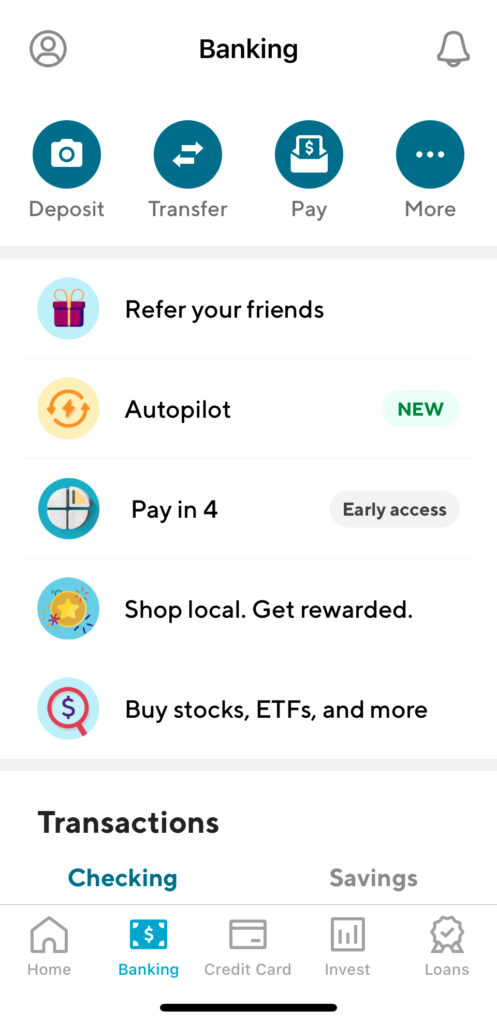
Navigating the NACA program requires financial discipline and strategic planning. To streamline the savings process, I recommend using SoFi Bank and its unique features, particularly the trifecta of SoFi’s free Checking Account, its free Savings Account, and the 20 Vaults you get. In a previous article, I provided an in-depth review of SoFi Bank, highlighting the numerous free and powerful money management features it offers to account holders. As you continue reading this article and decide you want to give SoFi Bank a try, then you can open a free account here. By doing so, not only will SoFi give you a $25 Welcome Bonus into your account, but SoFi will also send me a small thank you as well for the recommendation. It’s a small way to support the content I create if you decide to try any of my recommendations and strategies. Having been my preferred and primary bank since 2017, SoFi Bank has shown me that managing and monitoring your money can be easy and even enjoyable when you have a bank that integrates robust features in a user-friendly way. Most importantly, you don’t need to connect your bank account to any third-party apps because all of the money management features are seamlessly baked into your account.
Why SoFi Bank Is Perfect For NACA Members
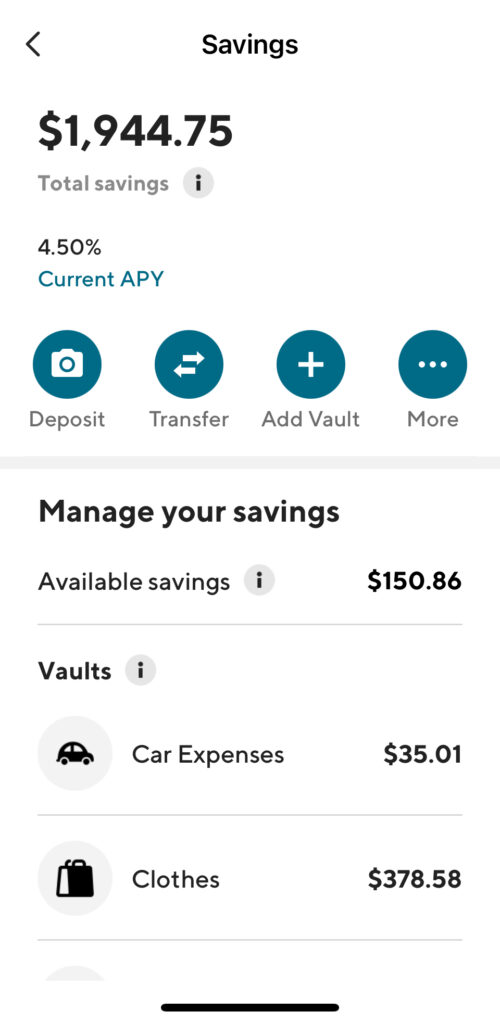
SoFi Bank offers a free Checking Account and a Savings Account with a distinctive feature—Vaults. These Vaults act as separate savings accounts within your Savings Account, making it easy to organize and document your savings patterns. If you are familiar with the “Envelope Budgeting Strategy” developed by financial guru Dave Ramsey, then you’ll recognize that SoFi Bank’s Vaults are just a digital equivalent to Dave Ramsey’s envelopes. Vaults makes it clear that you are following NACA’s savings pattern because after setting up your Autopilot rules, your NACA Mortgage Counselor will clearly see when and how much money is transferred into a Vault in any particular month. This makes it easy for your NACA Mortgage Counselor to simply compare the ending balance of this Vault or Savings account, to the balances from the previous month to verify that the balance this month grew by $200 (or by the amount of your Payment Shock).
On top of the technology implemented to make consistent saving an effortless practice, SoFi Savings Accounts and Vaults earn 4.60% interest (at the time of writing) each month. Since SoFi Bank’s Checking Account only earns 0.50% interest (at the time of writing), I suggest creating your budget and setting up SoFi Bank’s Autopilot to automatically split up the rest of your direct deposit according to the numbers in your budget. Autopilot will automatically transfer the amount from your Checking account into its respective Vault so that the money is earning high interest and being set aside for specific expenses. Using Vaults makes it a lot easier to respect your budget because it only takes a glance to know exactly how much you have put aside for each item in your budget. The question “Can I afford this?” is answered in a matter of seconds with few extra thoughts or calculations.
Structuring Your SoFi Bank Accounts
- Savings Account: Use your main Savings Account for your Emergency Fund. This bank account receives a direct deposit allotment of $200 per month ($100 if you are paid bi-weekly, $50 if you are paid weekly) to fulfill your Emergency Surplus savings requirement.
- Vaults: Utilize the Vaults feature to hold and earn interest on your Payment Shock money and Minimum Required Funds. Name each Vault according to its purpose for clean and organized documentation.
- Checking Account: Direct the remainder of your paycheck (after your allotments) into your Checking Account to be automatically budgeted into your Vaults using SoFi Bank’s “Autopilot” feature.
Creating a Payment Shock Vault
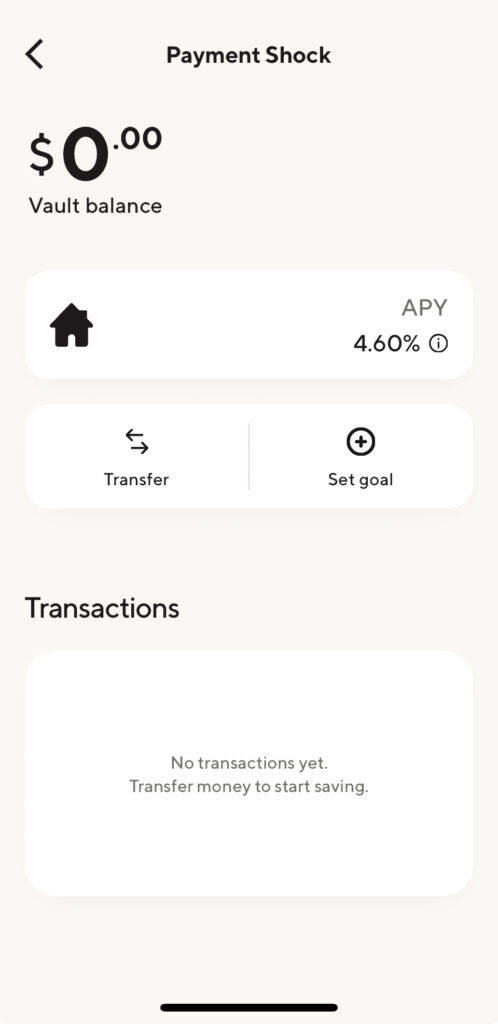
- If you haven’t set up a Vault that will hold your Payment Shock deposits yet, then go to your Savings account, tap on the “+ Add Vault” button, and create a Vault labeled “Payment Shock.”
- Skip the goal-setting line for the Payment Shock vault because Payment Shock is an ongoing deposit. Every month you are in the NACA program, you will need to be making these deposits so there’s no way to predetermine how much to aim for. This feature is better used for budget items such as a “Rent” vault, a “Vacation” vault, or even a “New Car” vault.
Automatically Splitting Up Your Direct Deposit
- Emergency Surplus: For this, set up a direct deposit allotment with your employer. Some employers allow you to do this online yourself, while some may need a form to be filled out with your account numbers and deposit amounts. You can find the account number and routing number of your SoFi Bank’s Checking and Savings accounts by opening your Banking tab and tapping the “More” button (with the three dots). On the More screen, you can always find your routing number and account number for both your SoFi Checking Account and your SoFi Savings Account. If you are paid bi-weekly, then create an allotment of $100 from each paycheck to go to your SoFi Savings Account. If paid weekly, then create an allotment of $50 per paycheck into this account. If you get paid once per month, then set it to $200 per paycheck.
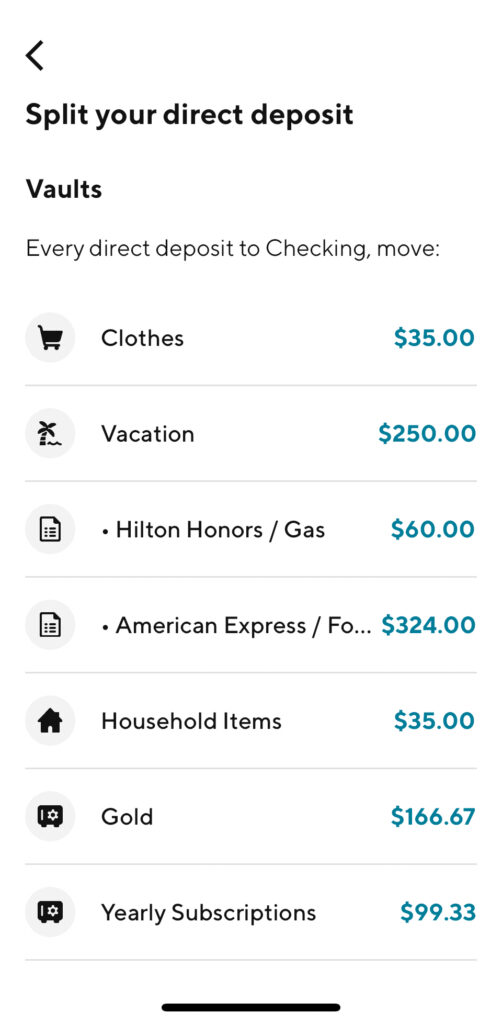
- Payment Shock: Open the SoFi Bank app or website, navigate to the “Banking” tab, and tap on “Autopilot.” Select the button that shows your latest direct deposit details, then scroll to the “Split your direct deposit” section. Select the “Payment Shock” vault, and enter the desired amount to be transferred each time your direct deposit hits your SoFi Checking account. Ensure the Frequency is set to “Every direct deposit”, then press the button to save this automation.


Using SoFi Autopilot to Manage Your Budget Effortlessly
In the realm of NACA’s homebuyers program, proving your ability to stick to a budget and savings commitments are crucial requirements. SoFi Autopilot emerges as a powerful tool, streamlining the budgeting process and creating a transparent paper trail for NACA’s review. Navigating the homebuying process can be inherently stressful, but with the combined features of Vaults and Autopilot, much of that stress can be alleviated. This ensures your bank statements are creating a paper trail for NACA to review that is easily understandable, effortlessly automated, and provides proof that you have been fulfilling the program’s money management requirements.
Set Up Your NACA-specific Vaults
- Identify Your Budget Categories: Begin by breaking down your budget into distinct categories. Common NACA-specific categories include Payment Shock, Rent, Minimum Required Funds, Bills, and Gas (or Transportation).
- Create Vaults for Transparency: Leverage SoFi’s Vaults feature to set up dedicated accounts for each category. This ensures a clear and organized view of your budget allocations.
Automatically Divide Up Your Paycheck with Autopilot
- Align Autopilot with Your Budget: Configure SoFi Autopilot to distribute funds into their respective Vaults with each direct deposit. This alignment automates your budget management, minimizing the need for manual intervention.
- Ensure Consistency: Autopilot guarantees that your budget allocations are consistently followed, offering a stress-free approach to staying within your financial parameters.
Beyond The NACA-specific Vaults
- Personalize Your Budget Vaults: Tailor additional Vaults based on your unique budget requirements. Consider both long-term savings goals (such as Vacations) as well as short-term expenses such as Going Out, Clothes, Household Items, and even individual Vaults for each credit card you use.
- Visualize Your Financial Landscape: Each Vault displays a real-time account balance, providing a quick snapshot of available funds for specific categories until your next paycheck. You will always know how much of your budgeted money you have left for Groceries and the other expenses in your budget.
The SoFi Autopilot Advantage
By integrating SoFi Autopilot into your budgeting strategy, you not only make your NACA documentation easier and clearer, but you’re also streamlining your financial management. The automated approach reduces stress, promotes consistency, and allows you to focus on achieving your financial goals. Explore the ease and efficiency of managing your budget effortlessly with SoFi Autopilot.
Pro Tip: Transfer Excess Money Out Of Your Checking Account
Once your budget automation is complete, consider transferring any extra money from your Checking Account to Vaults or your Emergency Fund. This ensures that every dollar from your paycheck is both earning high interest and designated for a specific purpose. Given SoFi Bank’s policy of not charging overdraft fees and automatically declining transactions that may lead to such fees, I maintain a $1 balance in my SoFi Checking account. The rest of my funds get divided into Vaults, aligning with my monthly budget and specific financial goals.
Conclusion
By simplifying and automating your savings pattern through SoFi Bank, you not only adhere to NACA’s requirements but also establish a seamless financial routine that aligns with your monthly budget. This approach ensures you stay on track with your spending, consistently growing your Emergency Fund, and progressing steadily toward homeownership.


